Stay Anonymous While Chatting Online
Learn simple ways to stay anonymous online, protect personal details, and make online chats feel safer.
Why Online Anonymity Matters
People search for how to stay anonymous while chatting online because they want connection without exposing their whole identity. Online anonymity helps internet users talk in chat rooms, online forums, random chat spaces, and a forum's chat service without putting their full life on display. Privacy means keeping information hidden by choice, while anonymity online means you can be visible in a conversation without showing exactly who you are. This matters because online interactions can involve strangers, third parties, screenshots, hidden records, and services that collect more data than most users expect.
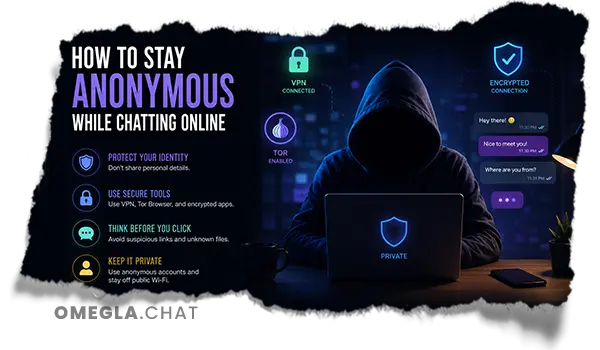
Staying anonymous is not only useful for people who are shy or private; it can also protect users from cyberbullying, harassment, identity theft, and unwanted contact. Whistleblowers, vulnerable users, and people discussing sensitive topics may need anonymity to protect their safety and relationships. At the same time, anonymity can be abused by cybercriminals, so it does not make illegal activity safe or invisible. Authorities and platforms may still track abuse, threats, fraud, or other crimes back to a person through logs, an account, metadata, or an IP address.
Anonymous Does Not Mean Careless
Being anonymous online does not mean sharing anything without thinking. You can remain anonymous only if your name, location, photos, messages, search history, and web activity do not connect back to the same identity. Many people lose anonymity because they reuse pet names, birthdays, profile photos, or usernames across social media platforms and chat apps. The safest approach is to stay anonymous with clear habits, not by trusting one app, one browser, or one setting to protect everything.
Online Privacy: Do Not Share Personal Information
The simplest rule is to avoid sharing personal details that could identify you outside the chat. Do not share your full name, phone number, mobile phone number, home address, school, workplace, email provider, family information, or anything that reveals your location. Even if one detail feels harmless, another person can combine it with social media posts, websites, or public records. This is why online privacy depends on separating your chat identity from your real identity.
If you need to create a profile for online chats, use a pseudonym instead of your real name. A random username generator can help you create a neutral name that does not include personal clues, and a default image or generic avatar is better than using your real photo. Disposable email or encrypted email can also stop a chat profile from being traced back to your main account. For extra separation, avoid using the same company for your email, cloud storage, password managers, and chat services when one subscription connects too much sensitive data together.
Keep Your Name, Location, and Phone Private
Your name, location, and phone are the fastest ways for strangers to connect a chat account to your real life. Never give a stranger your phone number, and do not move from an anonymous platform to a text message just because someone asks. Burner emails and separate accounts can reduce risk, but they only work if you do not add the same personal details again. If someone keeps requesting your private information, treat it as a warning sign and leave.
Avoid Sharing Social Media Accounts
Social media platforms are designed to connect identity, photos, friends, location hints, and history in one place. If you share online profiles during a chat, the other person may learn your family connections, job, school, interests, and daily routine very quickly. This can create privacy and security problems even when the conversation feels friendly. Keep your social accounts separate from anonymous chat spaces, especially when talking to strangers.
Check What Your Camera Shows
Video can reveal private information faster than text. Before turning on your camera, check the background for documents, mail, screens, calendars, street views, school logos, family photos, or other content that could reveal where you are. Hidden metadata in photos can also reveal identifying information, so be careful before sending images from your device. A clean background protects your identity and keeps the focus on the conversation.
Camera safety also includes your device permissions. Review which app, browser, and operating system settings have access to the camera and microphone. Public wi fi providers can add another layer of risk, so avoid private conversations on public networks when possible. If you must use them, be extra careful with private browsing, secure websites, and tools that reduce tracking.
Remove Identifying Details From Your Background
A blank wall, simple room, or blurred background is usually safer than a detailed room full of clues. Do not show bills, delivery labels, ID cards, certificates, or open tabs on your screen. If you use cloud storage such as Google Drive, close private files before starting a video chat so nothing sensitive appears by accident. Treat your camera background the same way you treat your profile: keep it simple, neutral, and hard to connect to your real identity.
Use Privacy-Friendly Chat Habits
Good habits can help you stay anonymous online even on ordinary websites. Use a separate browser profile for anonymous chats, block trackers with privacy focused extensions, and consider privacy extensions or an open source ad blocker to reduce unwanted tracking. Most websites use hypertext transfer protocol secure, or HTTPS, which helps protect data in transit, but HTTPS alone does not hide your identity from the website you are using. Read privacy policies when possible, especially if a platform asks for access to your contacts, camera, microphone, or location.
A virtual private network can encrypt your internet connection and hide your IP address from most websites, while also making it harder for your internet service provider to see your online activity. However, not all VPN services provide the same level of anonymity, and free VPNs may leak, log, or sell data. A VPN is one step toward online anonymity, not a magic shield. For stronger anonymity, Tor Browser routes your connection through multiple servers, but it can be slower and still requires careful behavior.
Do Not Click Suspicious Links
A link in a chat can be more dangerous than it looks. It may lead to phishing, malware, fake login pages, or a search engine result designed to collect information. DuckDuckGo and similar privacy tools can reduce search history tracking, but they cannot protect you if you willingly enter passwords on a fake website. If a stranger sends a link, do not click it unless you are sure it is safe.
Avoid Moving Too Quickly to Private Apps
Some people try to move a chat into private apps because they want more control over the conversation. Secure chat apps can be useful, but only if you understand what they protect and what metadata they may still expose. End to end encryption means only the sender and recipient should be able to read messages, and an encrypted messaging app can support private conversations better than standard messages.
Signal offers end-to-end encryption for messages and calls, WhatsApp uses end-to-end encryption for messages, iMessage offers end-to-end encryption for Apple users, Threema is another secure app, and Telegram provides end-to-end encryption only in Secret Chats rather than by default.
Protect Your Device and Accounts
Your anonymity is only as strong as the device and accounts you use. Keep your browser, operating system, chat apps, and security tools updated so you receive the latest protection. Use password managers to create strong passwords, avoid reusing passwords, and keep encrypted storage for sensitive data when possible. If privacy news shows a service has changed its policies or suffered a breach, review your settings and decide whether to keep using that platform.
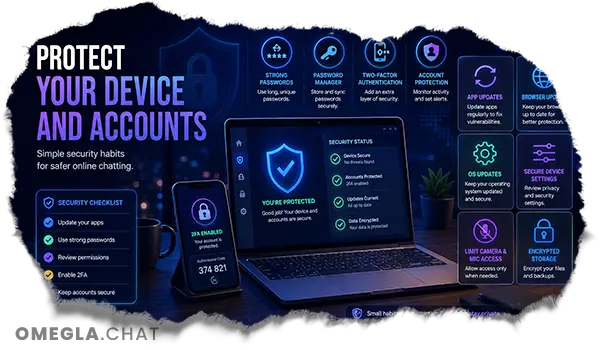
Separate your identities so one account does not connect everything. This is called compartmentalizing digital identity, and it means using different usernames, emails, images, and services for different purposes. Do not sign into personal accounts while trying to remain anonymous in another browser tab. If you mix your real identity and anonymous identity too often, services and third parties can connect them more easily.
Review Camera and Microphone Permissions
Check which websites and apps can access your microphone and camera before starting private conversations. Turn off location services for chat apps unless they truly need them, because GPS data can reveal more than you planned to share. Revoke old permissions from services you no longer use. A secure setup is not only about encryption; it is also about limiting access before a problem appears.
Know When to Leave a Chat
Anonymous chatting should still feel respectful and safe. If someone pushes for personal details, asks for photos, demands money, sends strange links, or tries to make you feel guilty, leave the conversation. Trust issues can appear when users remain anonymous, so the safest approach is to protect yourself without assuming every stranger is honest. You do not need to prove your identity to a person you just met online.
There is also a balance to remember. Anonymity can protect people from harassment, but it can also lead to more cyberbullying when users forget that a real person is on the other side of the screen. Use anonymity responsibly, follow platform rules, and avoid behavior that harms the community. Privacy is a fundamental human right, but it is not guaranteed online unless users and platforms both take it seriously.
Use Skip, Block, and Report Tools
If a chat becomes uncomfortable, use the skip, block, or report tools immediately. Do not wait for the situation to become worse, and do not feel responsible for continuing a conversation that feels unsafe. Reporting harmful behavior helps the platform protect other users. This blog post keeps the advice simple because one of the easiest ways to stay anonymous is knowing when to leave before a chat becomes risky.
Stay Anonymous on Omegla Chat
Omegla Chat gives users a simple platform for meeting new people, but smart privacy habits still matter. Use a neutral username, avoid sharing personal details, keep your background clean, and be careful before moving to other services. The goal is not to disappear completely; it is to enjoy chat, protect your identity, and keep control over what strangers can learn about you. With the right habits, Omegla Chat can help users have better conversations while staying more private online.