How to Look Better on Camera for Video Chat
Learn simple camera lighting and position tips to look better, feel more confident, and start better video chats.
First Impressions Matter in Random Video Chat
When people search for how to look better on webcam for video chat, they usually think about expensive equipment first. In reality, your first impression often depends on simple things like your camera angle, lighting, background, and how comfortable you look on screen. A clear image, a relaxed face, and a clean setup can make a big difference before you even start talking.
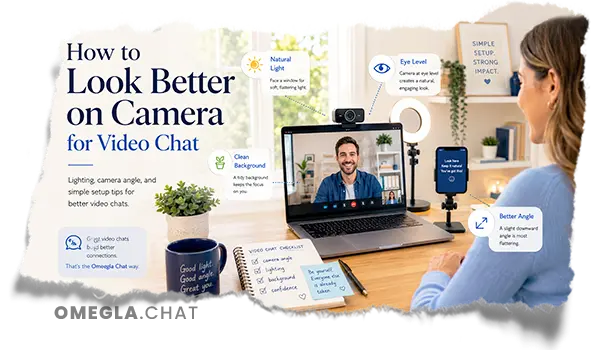
Random video chat moves fast, so most people decide within a few seconds whether they want to continue the conversation. If your webcam is too low, your phone is shaking, or your background feels distracting, the person on the other end may not give the chat enough time to become interesting. A better position, a brighter screen area, and more natural eye contact help you look your best and make the first moment feel more welcoming.
Don't Get Skipped by Other Users
Getting skipped can feel awkward, but small changes can reduce that problem quickly. Try sitting in a stable position, keeping your head in the middle of the frame, and looking toward the camera instead of only watching your own image on the computer screen. These simple tips help you appear more present, confident, and ready for a real conversation, which is exactly what many users want when they start a new video chat.
Improve Video Quality Before You Start
Before you start chatting, take a minute to check your internet connection, camera quality, and screen preview. A slow connection can make your video freeze, blur your image, or create awkward delays during the conversation, so using a stable Wi-Fi network or moving closer to the router can help a lot. Close extra browser tabs, pause downloads, clean your webcam lens, and make sure your camera is set to the best available video quality before your next chat begins.
Find the Best Camera Position
Your camera position changes how your face, head, and body language appear on screen. If the webcam is too low, it can create an unflattering angle, make your face look heavier, or emphasize a double chin; if it is too close, it can also distort your image. A better setup is to sit at least an arm’s length from the camera, keep your laptop or phone stable, and place the camera close to your computer screen so eye contact feels more natural during the chat.

Keep Your Camera at Eye Level
Keeping your camera at eye level is one of the easiest ways to look more confident and professional on a video call. You can use a laptop stand, a few books, or a small tripod to raise the webcam slightly, so the lens is level with your eyes or just a little above them. This position helps you maintain eye contact without staring down at the screen, and it makes your next video chat feel more like an in person meeting.
Look Natural and Comfortable on Camera
Looking natural on camera is not about being perfect; it is about appearing relaxed, present, and easy to talk to. Before a video meeting, check your hair, skin, and appearance in the preview, then sit comfortably and avoid putting your face too close to the lens. Small tricks like smiling slightly, keeping your shoulders open, and focusing on the person at the other end can make your video feel warmer and more natural.
Self-Confidence Is Everything
Self-confidence is everything because most people respond better to someone who seems comfortable than someone who is constantly adjusting the camera or worrying about every detail. It is normal to feel awkward at first, especially if you are used to zoom calls, virtual meetings, or video conferencing for work instead of casual video chat. Take a breath, sit still, use the mute button when there is background noise, and remember that simple tips often make the biggest difference.
Use the Right Lighting for Your Best Look
Lighting can completely change how you appear in a video call, video meeting, or video conference. The best light usually comes from the front, not from behind you, because a front-facing light source makes your face easier to see and helps your eyes pop on camera. Before your next video call, check your image on the computer screen and see whether your skin looks natural, your face looks bright, and your background is clear enough to keep the focus on you.
Not only that, good lighting can make you look more professional even if you are using a basic phone, laptop, or webcam. Dim lighting often makes the video look soft, tired, or low quality, while a ring light, floor lamp, or bright window can make a big difference in your appearance. You can also use simple software features in Zoom calls or other video conferencing tools, but the strongest result still comes from putting the light in the right position before your next video chat.
Use Natural Light When Possible
Natural light is often the most flattering option because it gives your face a softer and more balanced look. A simple example is sitting near a window and facing the window directly, so the natural sunlight lights your face evenly instead of creating strong shadows. If the sun is too harsh, move slightly away from the window or use a thin curtain, then clean your webcam lens and take a quick photo or preview shot to see the difference before starting the chat.
Avoid Backlight and Harsh Shadows
Backlight happens when the brightest point is behind you, and it can make your face look dark even if the room feels bright in person. Avoid sitting with a window, lamp, or strong computer screen behind your head, especially at night when one bad light source can create harsh shadows around your face. If your skin looks shiny, a small amount of makeup, concealer, or powder can help, and if you wear makeup, simple touches like mascara can make your eyes clearer without looking too heavy on video.
Choose a Clean Background
A clean background helps the other person focus on you instead of everything behind you. A blank wall, tidy shelf, or calm room usually works better than bold paintings, busy tapestries, moving family members, or clutter that pulls attention away from your face. Virtual backgrounds can be useful, but use them carefully, because some virtual backgrounds look unnatural, flicker around your hair, or make your body language harder to read; and when there is background noise, use the mute button until you are ready to talk.
Start Better Conversations on Omegla Chat
Looking better on camera is not about pretending to be someone else; it is about making the first few seconds feel more comfortable, clear, and friendly. Omegla Chat gives users a simple way to meet new people online, whether they want casual conversation, a quick video chat, or the feeling of connection that became even more important during years of social distancing. With better lighting, a cleaner background, the right camera position, and a little confidence, your next chat can feel more natural from the moment it starts.